You tap View insights under a Reel and get a screen full of numbers and small icons. Views, accounts reached, interactions, watch time, a heart, a speech bubble, a paper airplane and a bookmark. What do they all mean?
This guide explains each Instagram Insights number and icon in plain words. Every definition comes from Instagram's Help Center or Meta's developer documentation. Where Instagram has not documented something, we say so. The labels below match the app at the time of writing (October 2026), and Instagram renames metrics from time to time.
What do Instagram Insights mean?
Instagram Insights are the free stats Instagram gives you about your account and each post. They show how often your content was played (views), how many different accounts saw it (accounts reached) and what people did with it: likes, comments, shares, saves and follows. The full Insights screens need a professional account.
Here is the short version in one passage:
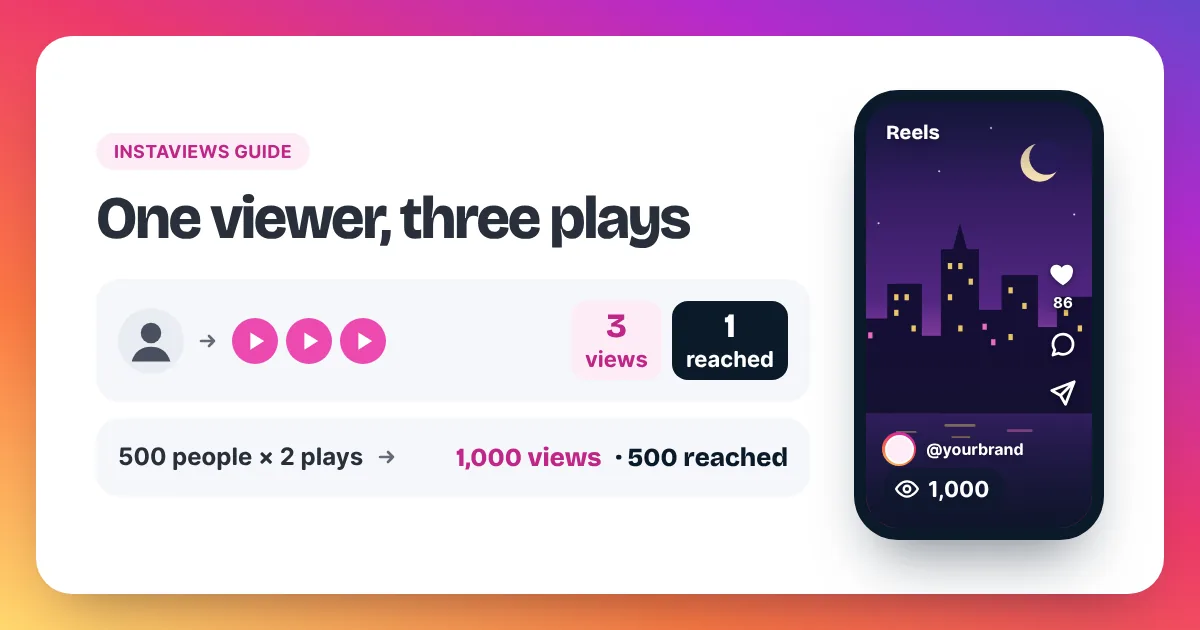
Instagram Insights measure three things: plays, people and actions. Views count plays. Instagram counts a view each time a Reel starts to play, and again each time it replays, and Meta defines views as the "total number of times IG Media has been played on Instagram". Accounts reached counts people. Meta defines reach as the "number of unique Instagram users that have seen the reel at least once" and marks it as an estimate. Interactions count actions. Meta's Business Help Center lists likes, comments, saves, shares and replies as content interactions. On a Reel, Insights also shows watch time, which is the total time the Reel was played, replays included, and average watch time. Meta says the data behind these metrics can be delayed by up to 48 hours. Impressions, the older count of showings, is deprecated for media created after July 2, 2024, so Views is now the main number.
Keep that split in mind and the rest of the screen gets much easier to read. For the full story on how a single view is counted, see our pillar guide to views on Instagram.
How do you open Instagram Insights?
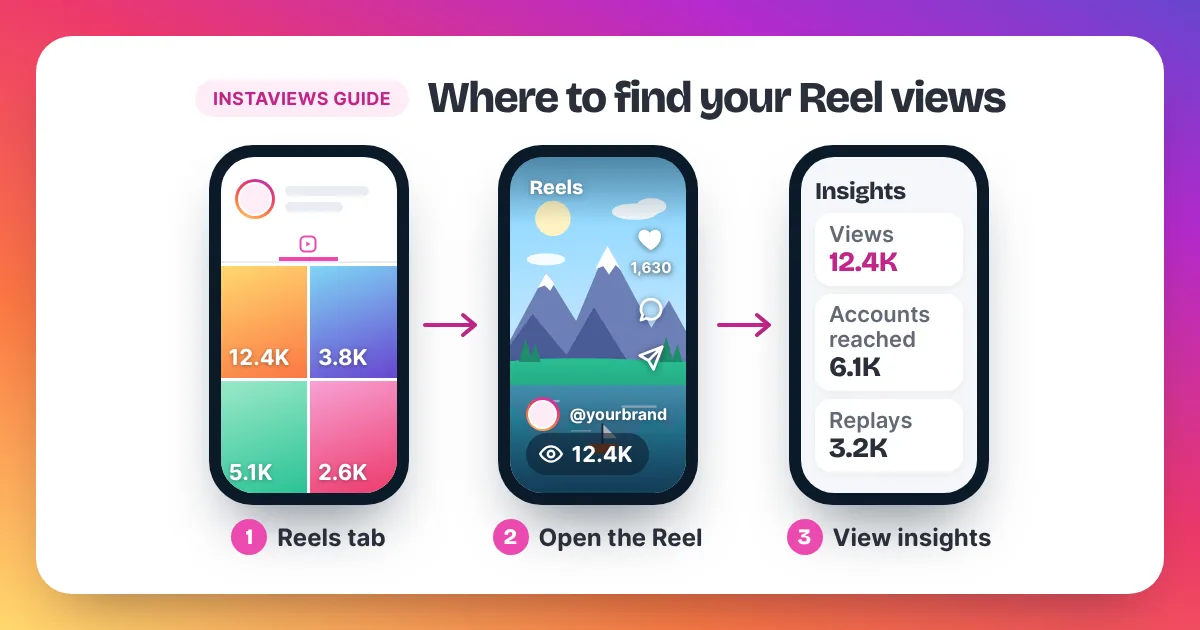
To open Instagram Insights, use a professional account. Switching is free: go to Settings, then Account type and tools, and pick Creator or Business. Then open Insights from your profile for account totals, or tap View insights under any post or Reel to see that post's numbers.
- Open Instagram and go to your profile.
- Open Settings and tap Account type and tools.
- Switch to a professional account and choose Creator or Business. You can switch back later.
- Back on your profile, open Insights to see totals for a time range you pick.
- To check one post, open it and tap View insights below it.
Instagram's Help Center says Reel insights are available for Reels posted on or after May 14, 2021. Our step-by-step guide on how to see your Instagram views shows where the count sits on Reels, photos and Stories.
What do the numbers on the Insights overview mean?
The Insights overview sums up your whole account for a time range you choose. Meta's Business Help Center says you can pick a preset or custom range within the past 90 days. It shows how many accounts you reached, how many engaged and your followers. Recent app versions may also lead with views.
- Views: all plays and displays of your content in the range, replays included.
- Accounts reached: how many different accounts saw your content at least once.
- Accounts engaged and interactions: how many accounts acted on your content, and how many actions they took (likes, comments, saves, shares, replies).
- Followers: your total and how it changed. Meta's Business Help Center says follower trends only appear once you have at least 100 followers.
The overview is good for spotting a trend. It is not the place to judge one Reel. For that, open the Reel and tap View insights.
What does each Reel insight mean?
Each Reel insight answers one question. Views: how often it played. Accounts reached: how many people saw it. Interactions: what they did. Watch time: how long they stayed. Follows: how many started following you after watching. Read them one by one below, with Meta's own wording where it exists.
Views
Views count every time the Reel starts to play, and every replay. Instagram's Help Center describes views on Reels as the number of times the Reel starts to play or replays. There is no published minimum watch time, so a play counts once it starts.
Accounts reached
Accounts reached counts different accounts, not plays. Instagram's Help Center describes it as the number of unique accounts that had your Reel on screen at least once, whether or not it played. The same Help Center's Reels insights page calls a similar idea "viewers", and both figures are marked as estimated.
Interactions
Interactions add up what people did with the Reel. Meta's developer documentation describes total interactions as likes, saves, comments and shares, minus unlikes, unsaves and deleted comments. So the number can go down as well as up.
Likes, comments, shares and saves
- Likes: how many accounts liked the Reel.
- Comments: how many comments it received.
- Shares: how many times people shared it, for example by sending it in a Direct message.
- Saves: how many times people saved it. Instagram's Help Center notes that only the person saving sees their saved posts, so Insights gives you a count, not names.
Meta's developer documentation adds one detail: likes, comments, views and total interactions report organic activity only. Interactions on ads that use the same post are not counted there.
Watch time and average watch time
Watch time is the total time your Reel was played, including replays. Average watch time is watch time divided by initial views, according to Instagram's Help Center. An initial view is the first time the Reel starts to play in a session, so average watch time tells you how long a typical viewer stayed on the first play and any replays. Meta's developer documentation lists total watch time as a metric still in development.
Follows
Follows counts accounts that started following you after viewing the Reel, per Instagram's Help Center. It is the closest Insights gets to "did this Reel grow my account?".
What about replays?
Replays are part of views. Meta also documents an initial play, when "the reel starts to play for the first time in a reel session". The gap between views and initial plays is roughly your replays. Whether Insights shows a separate replays line can vary by app version.
What do the icons in Instagram Insights mean?
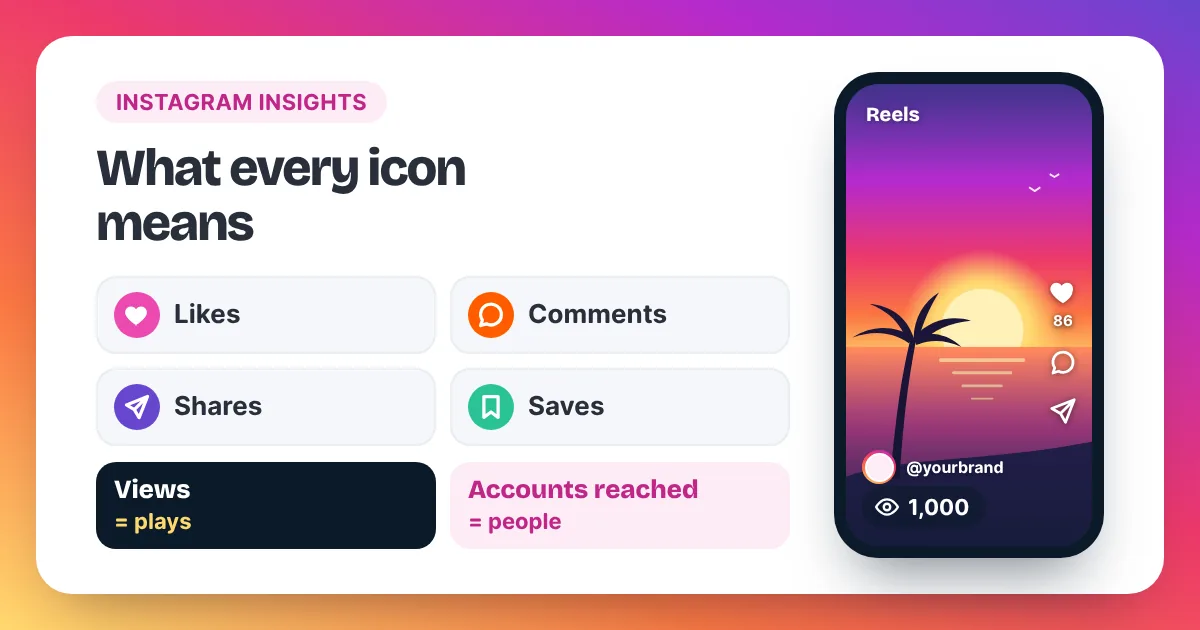
The icons in Instagram Insights match the buttons under every post. The heart is likes, the speech bubble is comments, the paper airplane is shares and the bookmark is saves. The number next to each icon is that post's total for that action, not a list of who did it.
| Icon | What it means | Where you see it |
|---|---|---|
| Heart | Likes: how many accounts liked the post | Under the post, on the Reel, and in the post's View insights |
| Speech bubble | Comments: how many comments the post got | Under the post, on the Reel, and in View insights |
| Paper airplane | Shares: how many times the post was shared, for example sent in a Direct message | Under the post (the share button), on the Reel, and in View insights |
| Bookmark | Saves: how many times people saved the post | Under the post (the save button) and in View insights |
A note on sources: Instagram's Help Center shows these buttons as small pictures rather than naming their shapes. What it does document is the action behind each one, such as saving a post or sending it as a Direct message from below the post. The table links each familiar button to the count Insights shows for it.
What does the paper airplane mean on Instagram Insights?
The paper airplane is Instagram's share button. When someone taps it, they can send your post to a friend in a Direct message or share it in other ways. In Insights, the number next to the paper airplane is the post's shares. It does not show who shared it, and it is not a count of your own messages.
How do you read Instagram Insights together?
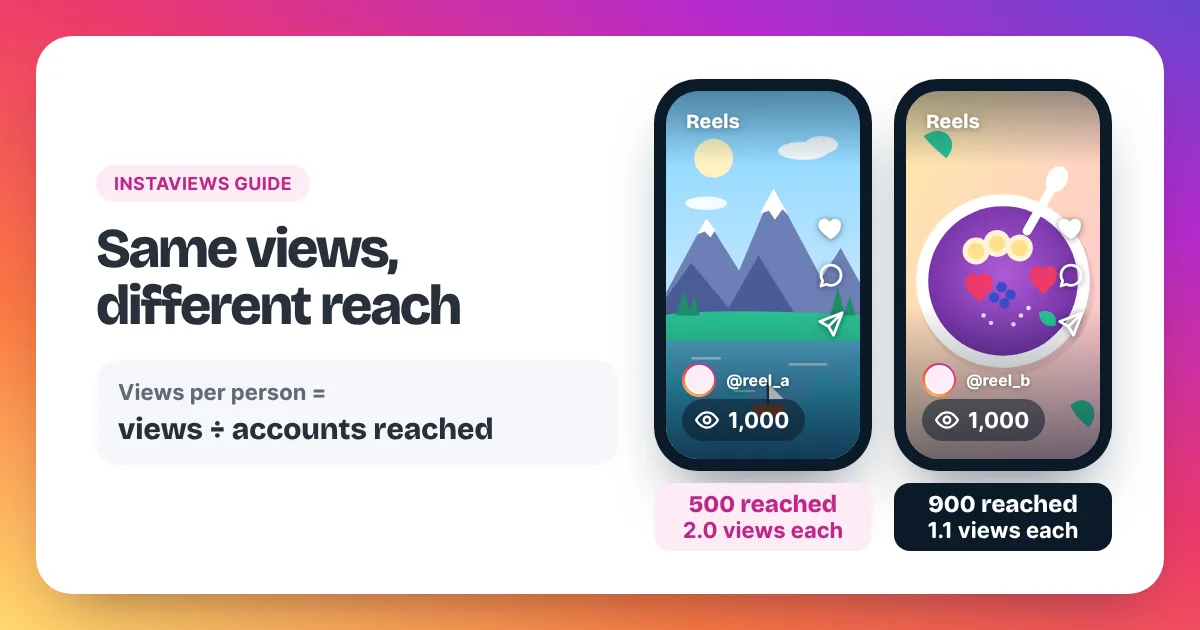
Read Instagram Insights in pairs, not one at a time. Divide views by accounts reached to see plays per person. Compare average watch time with the Reel's length to see if people stay. Then look at shares, saves and follows to see whether people acted. Compare each Reel with your own average.
Three simple checks cover most questions:
- Views ÷ accounts reached. A Reel with 1,000 views and 500 accounts reached has 2.0 views per account. People watched it twice on average. Our guide to Instagram views vs reach works through more examples.
- Average watch time vs length. If a 20-second Reel has an average watch time of 6 seconds, most viewers leave early. The opening needs work.
- Actions per 1,000 views. 30 saves on 3,000 views is 10 saves per 1,000 views. Work this out for your last 10 Reels and use your own average as the benchmark. There is no official one.
Our homepage summary of views, reach and impressions shows the three counts side by side. If your numbers keep dropping, our guide on why your Instagram views are low lists the usual causes.
What are the most common Instagram Insights mix-ups?
The most common Instagram Insights mix-ups are reading views as people, looking for impressions on new posts, expecting reach to be exact and judging a Reel in its first hours. Views count plays, impressions is deprecated for newer media, reach is an estimate and data can lag by up to 48 hours.
- Views are not people. One person who watches three times adds three views and one account reached.
- Impressions are gone on new posts. Meta lists impressions as deprecated for media created after July 2, 2024. Do not compare an old post's impressions with a new post's views.
- Reach is estimated. Meta marks it as an estimate, so small gaps are normal.
- Numbers can lag. Meta says the data can be delayed by up to 48 hours. Check a Reel again after two days before you judge it.
- Your own plays are unclear. Instagram has not published a clear rule on whether your own plays count. Accounts reached is the safer number if you worry about it.
- Labels change. Meta lists some metrics as "in development", and Instagram has renamed counts before: older Help Center pages talk about plays where the app now shows views. If a label looks different, the idea behind it is usually the same.
Some creators add bought views to a Reel they believe in. Be clear about what that changes. Bought views raise the view count. They are not people who chose to watch, so read accounts reached, watch time and saves on their own terms. Meta's Spam policy lists attempts to "artificially increase viewership", and Instagram can remove plays it treats as inauthentic, so keep any order in proportion to your account. Our Instagram Reel views page has the details.
Instagram Insights: frequently asked questions
What do the symbols on Instagram Insights mean?
The heart is likes, the speech bubble is comments, the paper airplane is shares and the bookmark is saves. Each number is that post's total for the action.
Are Instagram Insights free?
Yes. Insights cost nothing. You only need a professional account, and switching to Creator or Business in Settings is free.
Can I see Insights on a personal account?
Instagram's Help Center page on Reels insights mentions public accounts, personal or professional, so you may see some Reel stats on a public personal account. The full Insights hub with the account overview needs a professional account.
Why don't my Insights match the view count on the Reel?
Timing is the usual reason. Meta says Insights data can be delayed by up to 48 hours, so the public count and Insights may differ for a while after posting.
How far back do Instagram Insights go?
Instagram's Help Center says Reel insights are available for Reels posted on or after May 14, 2021. The account overview lets you pick ranges within the past 90 days.
Are Instagram Insights accurate?
Views, likes and comments are counts. Reach is an estimate, and Meta lists some metrics as still in development. Use Insights to compare your own posts over time. Our Instagram views glossary defines each term in one line.
Sources named in this guide: Meta for Developers, Instagram media insights metrics (views, reach, initial plays, total interactions, watch time, the 48-hour delay and the impressions deprecation); Instagram's Help Center, View insights on your Instagram reels and Save posts you see on Instagram; Meta's Business Help Center, About Instagram insights; and Meta's Spam policy.