You post a Reel. An hour later it says 1,200 views. But how many people is that? Did your own plays count? And why does Insights show a different number called "accounts reached"?
This guide answers all of it in one place. You will learn what views on Instagram mean, how each format is counted, where to find the numbers and how to read them without fooling yourself. Every fact about counting comes from Meta's own documentation, and we say so clearly when something is an inference.
What are views on Instagram?
Views on Instagram are the number of times your Reel, video, photo or carousel was played or shown. Meta's developer documentation defines views as the "total number of times IG Media has been played on Instagram". So views count plays, not people, and one person can add several views to the same Reel.
That one idea explains most of the confusion around the number. A view is an event, not a person. Here is the short version you can save or share:
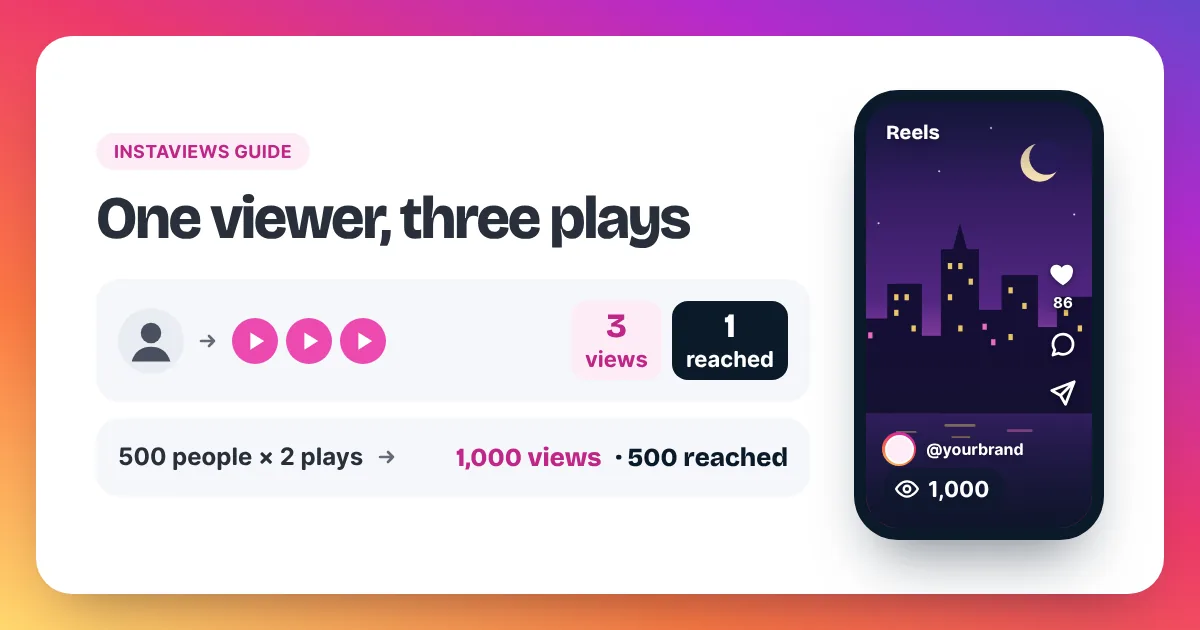
Instagram counts a view each time a Reel starts to play, and again each time it replays. Meta's developer documentation defines views as the "total number of times IG Media has been played on Instagram". For photo and carousel posts, a view is counted each time the post shows on screen. Because replays count, views measure plays, not people. Meta tracks people with a separate metric called reach, which it describes as the "number of unique Instagram users that have seen the reel at least once". A simple example shows the gap. If 500 people each watch your Reel twice, the Reel shows about 1,000 views but reaches 500 accounts. The public view count has no minimum watch time. Impressions, the older count of how often a post was shown, is listed by Meta as deprecated for media created after July 2, 2024, and Views is now the main number.
Keep that example in mind. Most questions in the rest of this guide come back to the same gap between plays and people. For a shorter version, see how Instagram counts views on our homepage.
How does Instagram count views on Reels, videos, photos and carousels?
Instagram counts views on Reels and videos each time they start to play, and again on every replay. Photo and carousel posts count a view each time they show on screen. The rule is the same idea for every format: each play or display adds one, whoever it comes from.
The table sums up what adds a view for each format and where you can read the number.
| Format | What adds a view | Where you see it |
|---|---|---|
| Reel | Each time it starts to play, and again on each replay | On the Reel, on its thumbnail in your Reels tab, and in Insights |
| Video in the feed | Each time it is played; replays count again | On the post, and in Insights on a professional account |
| Photo post | Each time the post shows on screen | In Insights on a professional account |
| Carousel post | Each time the post shows on screen | In Insights on a professional account |
Reels
Reels are where views matter most. Instagram counts a view the moment a Reel starts to play. If the Reel loops and plays again, that is another view. Meta's documentation also describes a narrower idea, the initial play: when "the reel starts to play for the first time in a reel session". Initial plays leave out replays, so they sit closer to the number of people who watched.
The public count on the Reel is the full tally of plays, replays included. That is the number your followers see.
Videos in the feed
Videos follow the same rule as Reels. Meta's definition talks about "IG Media", which covers videos as well as Reels. Each play adds a view, and a second play by the same person adds another. If you want a deeper look at video posts, our page on Instagram video views explains which links work for video orders.
Photos and carousels
Photos and carousels cannot be "played", so Instagram counts a view each time the post shows on screen. Someone who scrolls past your photo twice in a day can add two views.
On a personal account you will not see these numbers. Switch to a free professional account in Settings → Account type and tools to unlock Insights.
Do your own views count on Instagram?
Instagram has not published a clear rule on whether your own plays add to your view count. Meta's definition counts the total number of times media was played on Instagram and does not mention the creator. Creator guides disagree. So treat your own plays as an unknown and never use them to judge a Reel.
Here is what we can say with confidence, and what is only an inference.
- What Meta says: views are the "total number of times IG Media has been played on Instagram". The wording does not exclude any viewer.
- What Meta does not say: whether a play by the account that posted the Reel is filtered out. We found no Meta page that answers this directly.
- Our inference: because the definition is silent, you cannot rule your plays in or out. Many creator guides say your own plays do not count, while a few say they do. Neither is an official source.
In practice this matters very little. You might check a new Reel a few times. Your audience plays it hundreds or thousands of times. If you want a number that cannot be padded by your own replays, look at accounts reached in Insights. Reach counts unique users, so one account adds at most one, however often it watches.
Do replays and rewatches count as new views?
Yes. Replays and rewatches count as new views on Instagram. Instagram counts a view each time a Reel starts to play, and again each time it replays. So a viewer who watches your Reel three times adds three views, but only one account reached. That is why views are usually higher than reach.
This is good news for short Reels. A Reel that loops cleanly, where the ending flows back into the start, earns extra plays from the same viewers. Those plays are real views, not a glitch.
Professional accounts can split the number. Insights shows views, replays, watch time and accounts reached. Compare replays with total views to see how often people watched again.
Does Instagram count views from the same person? Yes, on the view count. No, on reach. The same person shows up once in accounts reached, however many times they watch.
Is there a minimum watch time for an Instagram view?
There is no minimum watch time on the public Instagram view count. Meta defines views as the total number of times media was played, and an initial play as when a reel starts to play for the first time in a session. Neither definition mentions seconds watched, so a play counts once it starts.
You may read elsewhere that a view needs three seconds, or some other figure. Meta's Instagram documentation does not say that, so we do not repeat it. Other Meta products, such as Facebook, have their own video metrics with their own definitions. A rule you read about Facebook video views does not carry over to Instagram's view count.
Watch time is still worth tracking. It is a separate number in Insights. It shows how long people actually stayed, which the view count alone cannot tell you.
What is the difference between views, accounts reached and impressions?
Views count every play or display, including repeats. Accounts reached counts the different accounts that saw your post at least once. Impressions was the older count of times a post was shown. Meta lists impressions as deprecated for media created after July 2, 2024, and Views is now the main number.
| Metric | What it counts | Example |
|---|---|---|
| Views | Every play or display, including replays | 1 person watches your Reel 3 times = 3 views |
| Accounts reached | Different accounts that saw it at least once | That same person = 1 account reached |
| Impressions | Older metric for total times shown | Deprecated by Meta for media created after July 2, 2024 |
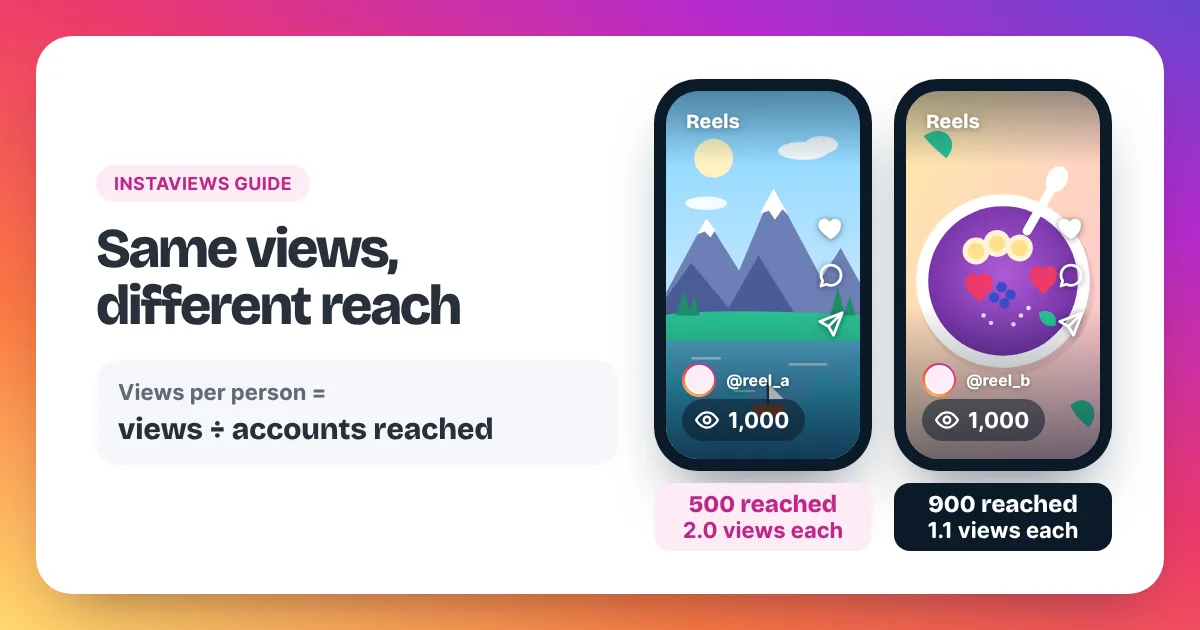
A quick way to read the two live numbers together is to divide them. Views ÷ accounts reached gives you the average plays per account. If a Reel has 1,000 views and 500 accounts reached, each account played it 2.0 times on average. Our full guide to Instagram views vs reach walks through more examples. The homepage table on views, reach and impressions gives the one-glance version.
One more detail: Meta marks reach as an estimated metric. Small differences between reach and the numbers you expect are normal.
Where can you see views on Instagram?
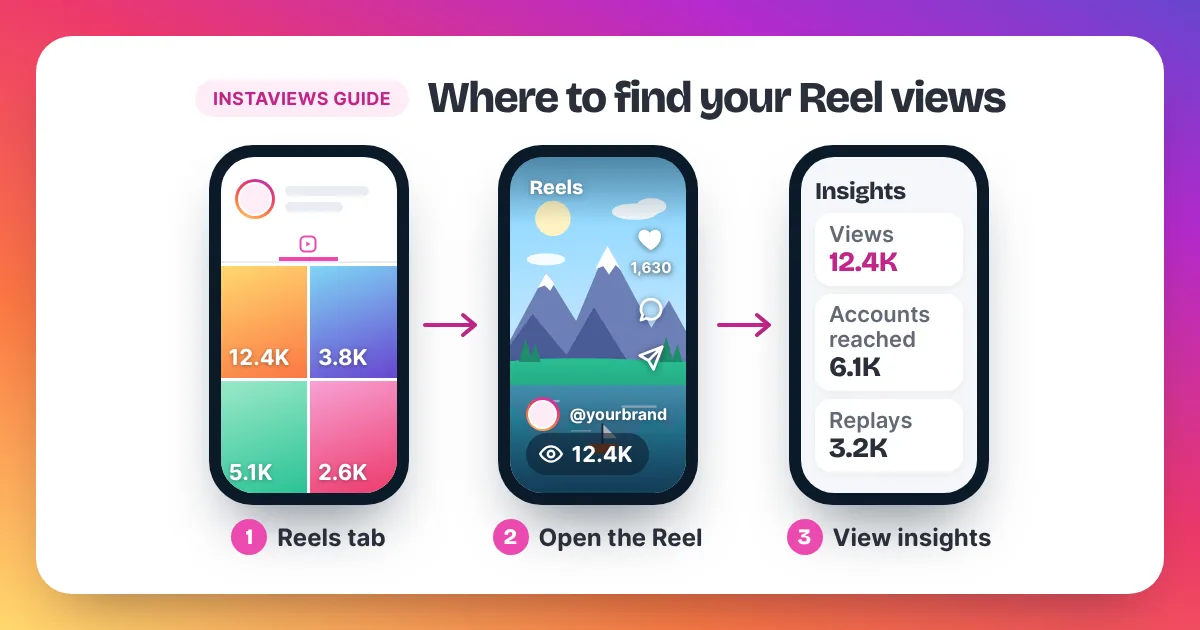
You can see views on Instagram on the Reel itself, on each Reel thumbnail in your profile's Reels tab, and in Insights. Open the Reel to see its count. On a Creator or Business account, tap View insights under the post for views, replays, watch time and accounts reached.
- Open your profile and tap the Reels tab. Each Reel shows its view count on the thumbnail.
- Tap a Reel to open it and see the count on the video.
- On a professional account, tap View insights for the full breakdown.
- No Insights? Switch to a free professional account in Settings → Account type and tools.
Our step-by-step guide on how to see your Instagram views covers posts, Reels and older videos, with what each screen shows. Profile views are a different topic. If you want to know what Insights tells you about visits to your profile, read how to see profile views on Instagram.
Why did view numbers change after Instagram switched to views?
View numbers changed because Instagram moved from impressions to views as its main number. Meta lists impressions as deprecated for media created after July 2, 2024. Views now count plays and displays across formats, so old and new posts are measured in different ways and should not be compared directly.
Here is the change in order, using only what Meta's documentation and our homepage state.
| Stage | What you saw | What it means for you |
|---|---|---|
| Older posts | Impressions, the count of times a post was shown, next to reach | Old numbers used a different metric |
| Media created after July 2, 2024 | Impressions listed as deprecated by Meta | No impressions figure for new media |
| Now | Views as the main number, alongside reach | Compare new posts with new posts |
If your numbers look higher or lower than last year, check that you are comparing the same metric. A photo's old impressions and its new views are not the same thing. Compare Reels with Reels, and recent posts with recent posts.
If your views dropped and the metric did not change, something else is going on. Our guide on why your Instagram views are low lists the common causes and fixes.
Are Instagram view counts public and accurate?
Instagram view counts on Reels are public by default, but the list of viewers is not. Instagram does not show a public list of who viewed a Reel or video; followers only see the total. The count is accurate for what it measures, plays and replays, but it is not a count of people.
Three things are worth knowing about accuracy:
- Timing: the public count usually updates within minutes. Insights can take longer to refresh. If a number looks stuck, close and reopen the app.
- Plays, not people: a high count can come from a smaller group watching many times. Check accounts reached for the people count.
- Clean-up: Instagram can remove plays it treats as inauthentic, so a count can move down as well as up.
You can also choose not to show counts. Instagram lets you hide like and view counts on your own posts. Our guide on how to hide views on Instagram shows the steps and how to turn counts back on.
How many views is good on Instagram, and how do you get more?
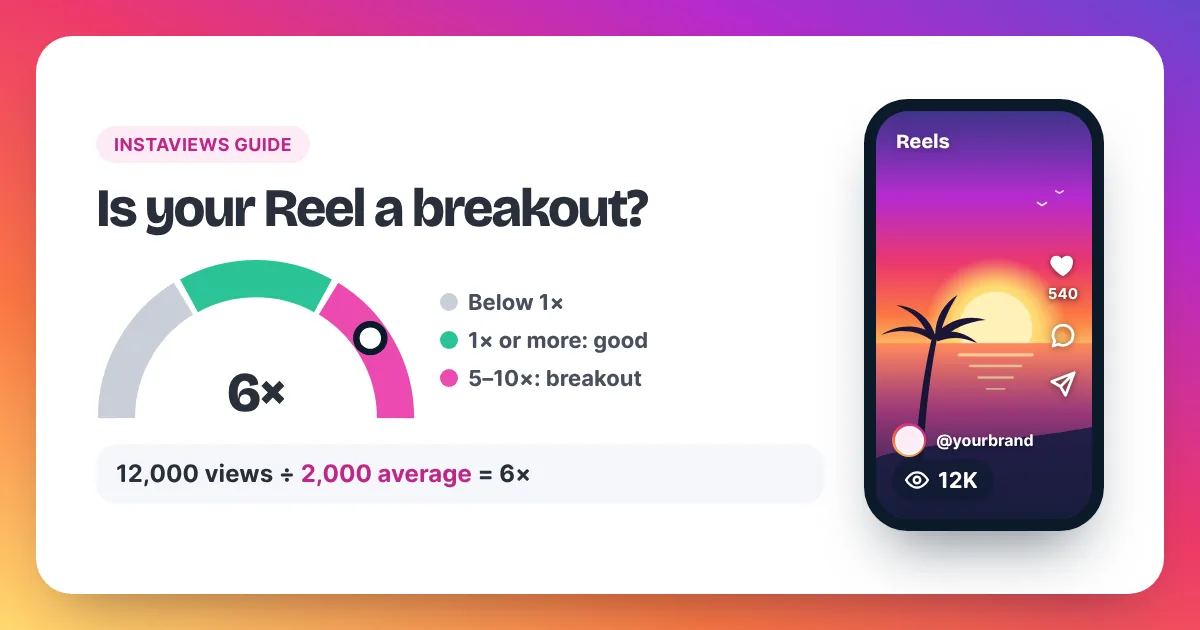
A good number of views on Instagram is one that beats your own average. There is no official viral number. Add up the views on your last 10 Reels, divide by 10, and use that as the number to beat. Then improve the hook, captions and timing of your next Reel.
Here is a worked example. Your last 10 Reels add up to 20,000 views. Divide by 10, and your average is 2,000 views per Reel. A new Reel above 2,000 is a good result for your account. Our rule of thumb is that a Reel at 5 to 10 times your average, so 10,000 to 20,000 views here, is a breakout. That is our own yardstick, not an Instagram number.
Our guide on how many views is viral on Instagram adds the views-to-followers and views-to-likes maths. For practical steps, from the first two seconds to posting time, read how to get more Instagram Reel views.
A common follow-up question is money. Views alone are a count, not a payout. If you want to know how creators earn, read our guide on whether Instagram pays for views, which sticks to what Meta itself says about payouts.
Can you buy views on Instagram?
Yes, you can buy views on Instagram for a public Reel, video or post. On Instaviews you paste the public link, choose 2,000 to 5,000,000 views and pay. Delivery starts within 2–5 minutes after payment, and the views show in the same public count on your post.
Prices drop as packs get bigger. Here are a few packs from our price list:
| Pack | Price | Per 1,000 views |
|---|---|---|
| 2,000 views | $3.98 | $1.99 |
| 10,000 views (Most Popular) | $15.90 | $1.59 |
| 50,000 views | $59.50 | $1.19 |
| 100,000 views | $99.00 | $0.99 |
| 1,000,000 views | $690.00 | $0.69 |
We only need a public link, never a password. Story and profile links are not accepted, and the post must be public while the order runs. Views arrive at a steady pace and are non-drop.
Be honest with yourself about the limits. Meta's Spam policy lists attempts to "artificially increase viewership", and Instagram can remove plays it treats as inauthentic. Bought views raise the count; they do not make people like, share or follow. Keep each order in proportion to your account. Our guide on whether you can buy Instagram views covers the pros and cons in full, and our Reel views page explains how a Reel order works.
Views on Instagram: frequently asked questions
Does Instagram count views more than once from the same person?
Yes. Each play adds a view, so the same person can add several views to one Reel. Accounts reached counts that person only once.
What does "views" mean on an Instagram photo post?
On a photo or carousel post, Instagram counts a view each time the post shows on screen. You can read it in Insights on a professional account.
Can you see who viewed your Reel?
No. Instagram does not show a public list of who viewed a Reel or video. You see the total count, and Insights shows totals such as accounts reached. Our guide on whether you can see who views your Reels explains what you can see instead.
How fast does the Instagram view count update?
The public count usually updates within minutes. Insights can take longer to refresh. If a number looks stuck, close and reopen the app before you worry.
How long do you have to watch for a view to count on Instagram?
Meta's Instagram definitions don't mention a number of seconds. A view is counted when a Reel starts to play, so even a short play counts. Watch time is a separate number in Insights if you want to know how long people stayed.
Where do I find the Instagram view count?
The view count shows on each Reel and on its thumbnail in your profile's Reels tab. On a professional account, tap View insights under a post for views, replays and accounts reached. Our guide on how to see your Instagram views shows every screen, and our guide to what every Instagram Insights number means explains each metric.
Is the Instagram view count the same as the number of viewers?
No. The view count is a tally of plays and replays. For the number of different people, check accounts reached in Insights. Our Instagram views glossary defines both terms in one line each.
Do views from Instaviews show in the normal count?
Yes. The view count is Instagram's own tally of plays, and views from Instaviews show in that same public count on your post.
About this guide: it is written by the Instaviews team, an Australia-based social media marketing company. You can read more about Instaviews and our authors. Sources named in this guide are Meta for Developers (Instagram media insights metrics), Instagram's Help Center articles on Reels insights and on Instagram insights, the Facebook Help Center article on showing or hiding view counts on your Instagram profile, and Meta's Spam policy.