Most Reels lose viewers in the first few seconds. The good news is that the fixes are small, and most of them are free. A sharper opening, captions, better timing and a weekly look at your numbers will do more than any trick.
This guide gives you 15 steps, a table that links each Insights number to a fix, and an honest look at "views increase" apps and paid options. If you only want the short version, our homepage lists 12 quick ways to get more Instagram views.
Use this page as a checklist. Change one thing per Reel, compare the result with your own average, and keep what works.
What is the fastest way to increase Instagram views?
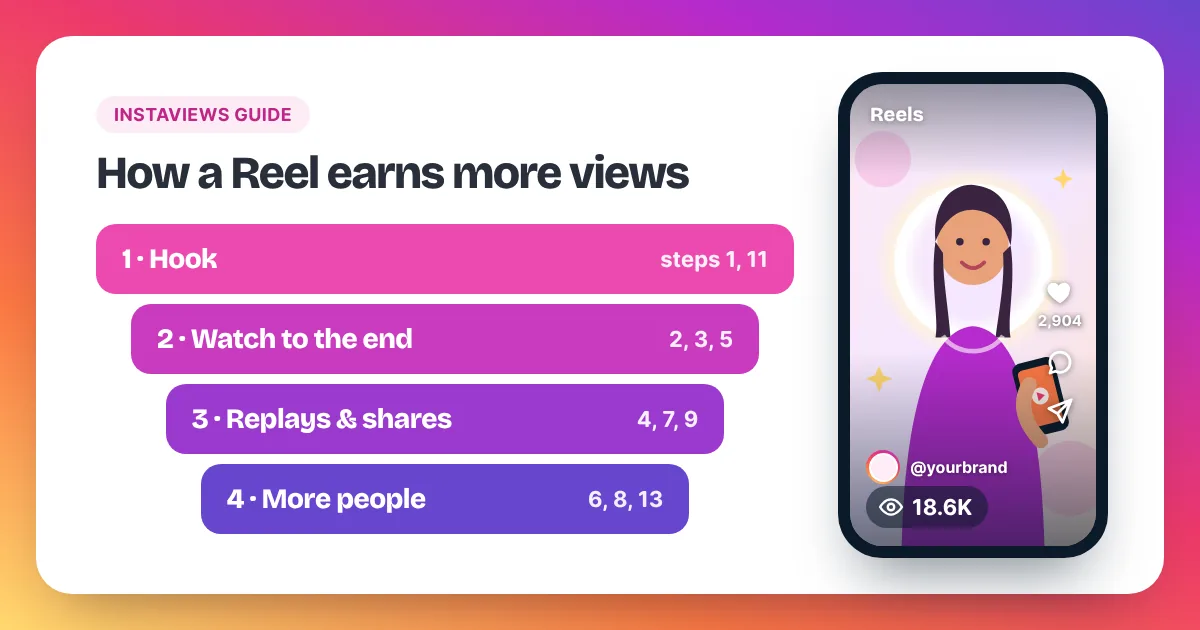
The fastest way to increase Instagram views is to fix the first two seconds of your Reel. A clear hook keeps people watching, and watching leads to replays, shares and more people seeing the Reel. After the hook, add captions, post when your followers are online and share each Reel to your Story.
Instagram Reel views come from five levers you control. The first is the hook: the opening seconds decide whether people keep watching or swipe away. The second is watch-through: tight edits and on-screen captions help people stay to the end, including those who watch with the sound off. The third is replays. Instagram counts a view each time a Reel starts to play, and again each time it replays, so a Reel that loops cleanly can earn extra views from the same person. Meta's developer documentation defines views as the "total number of times IG Media has been played on Instagram". The fourth is timing: posting when your followers are online gives a Reel a stronger first hour. The fifth is shares, because every Reel sent to a friend reaches a new account. Instagram's creator guidance on its Instagram for Creators site also encourages original videos over reposted clips. None of these levers promises a number, but together they give each Reel a fair chance.
15 steps to get more Reel views
The steps follow the life of a Reel: first the video itself, then how you post it, then how you learn from it. You don't need all 15 at once. Start with steps 1 to 6, because they shape every Reel you make.
1. Hook viewers in the first two seconds
Open with the most interesting moment, not with a logo or a slow "hi guys". Show the result first, ask a sharp question, or put a short promise on screen, such as "3 mistakes that ruin a latte". Then deliver the first mistake straight away. If the opening doesn't earn the next second, nothing else on this list can save the Reel.
2. Add on-screen captions
Many people scroll Reels with the sound off. Captions let them follow along without tapping. Keep the text large, high on the screen and away from the buttons on the right side, so nothing covers it. Short lines of three to six words are easier to read at scrolling speed.
3. Use trending audio when it fits
Trending sounds are one option, not a rule. A popular sound can help people recognise the format, but it only works when it suits your idea. A clear voiceover or your own original audio is often the better choice for tutorials and reviews. Pick the sound for the viewer, not for the trend.
4. Make the Reel loop
Because replays count as views, a Reel that flows from its last frame back into its first can earn more plays from the same viewer. End on a line that leads back to the opening, or cut the final shot so it matches the first one. Viewers often watch a second time before they notice the loop.
5. Keep it as short as the idea needs
There is no magic length. Cut every second that doesn't add something. If your idea fits in 12 seconds, don't stretch it to 40. A shorter Reel is easier to watch to the end, and a finished watch is a better signal than an abandoned one.
6. Post when your audience is online
On a professional account, Insights shows when your followers are most active. Post shortly before your busiest hours so the Reel has an audience in its first hour. If your followers live in several time zones, test two or three posting times and keep the one that wins.
7. Share every Reel to your Story
Your Story reaches followers who may have missed the Reel in their feed. Add a poll or a question sticker so people tap, then point them to the full Reel. It gives every Reel a second door.
8. Collaborate with another creator
Instagram's Collab feature lets you invite another account as a collaborator, so the Reel can appear for both audiences. Pick partners whose followers would enjoy your content, such as a bakery and a local coffee shop.
9. Reply to comments with a Reel
Instagram lets you answer a comment with a video reply. When someone asks a good question, turn your answer into a new Reel. You get a ready-made topic, and the person who asked has a reason to watch and share it.
10. Use a few relevant hashtags
Hashtags help describe what your Reel is about. Choose a few that match the topic exactly, such as #latteart for a latte art tutorial. Long lists of unrelated tags don't make a weak Reel stronger.
11. Choose a clear cover image
The cover shows on your profile grid and when people browse your Reels tab. A readable title on the cover helps visitors pick the next Reel to watch. That matters, because profile visitors who watch two or three Reels add views to each one.
12. Turn good ideas into a series
When a Reel does well, make part 2. A series gives people a reason to follow and come back, and each new part can send viewers to the earlier ones.
13. Share outside Instagram
Post the Reel link where your audience already spends time: a newsletter, a community group, your website or other social platforms. Every play from that link counts like any other play.
14. Test two versions of the same idea
Not sure which hook works? Post the same idea twice, on different days, with a different opening. Keep everything else the same. The version with more views and longer watch time tells you what your audience prefers, and you can reuse that pattern. Instagram's Trial Reels let you test a version on non-followers first; our guide to Instagram Trial Reels shows how.
15. Review Insights once a week
Set a fixed time each week to look at your last few Reels. Write down views, accounts reached and shares, then compare each Reel with your own average. Over a few weeks, your best length, topic and posting time will show.
Which Insights numbers tell you why views are stuck?
Instagram Insights tells you where viewers drop off. Low views with low reach mean few people were shown the Reel. Good reach with short watch time points to a weak hook. Few shares mean the Reel isn't worth passing on yet. Check the numbers in that order and fix the first weak one.
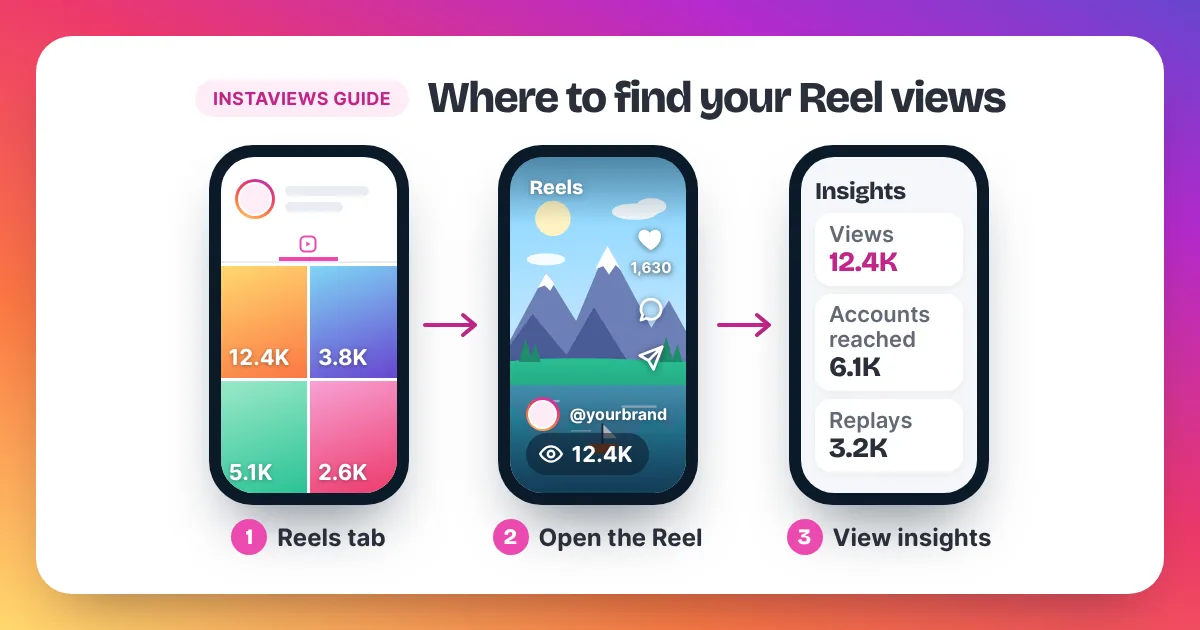
Insights is free on professional accounts. If you are not sure where each number lives, our guide on how to see your Instagram views and Insights walks through every screen.
| Insights number | What it tells you | What to try |
|---|---|---|
| Views | Every play, including replays | Compare with your average of the last 10 Reels |
| Accounts reached | How many different accounts saw the Reel | Post at your most active time; share to your Story |
| Watch time | How long people stayed | Rewrite the first two seconds; cut slow parts |
| Replays | Plays after the first one | Build a loop into the ending |
| Shares and saves | Whether people found it worth keeping or sending | Add a useful tip, a list or a clear takeaway |
| Most active times | When your followers use Instagram | Move your posting time to match |
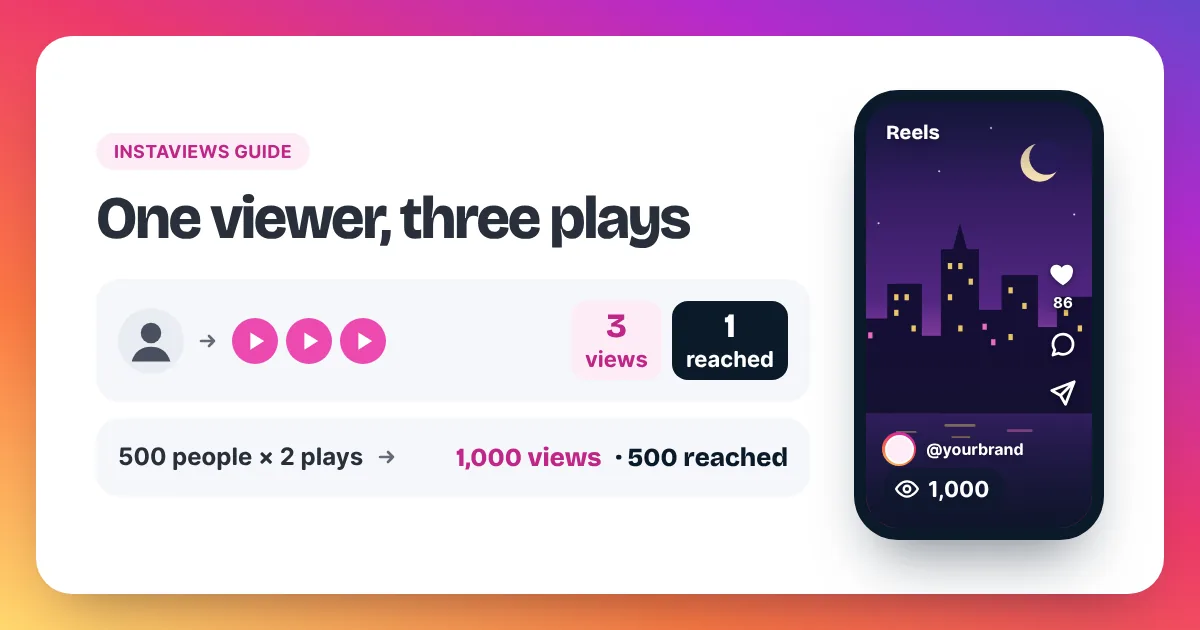
A quick sum helps here. Divide views by accounts reached to see plays per person. If 500 accounts each watch twice, you get about 1,000 views, or 2 plays per person. A rising ratio usually means your loop or your content is pulling people back.
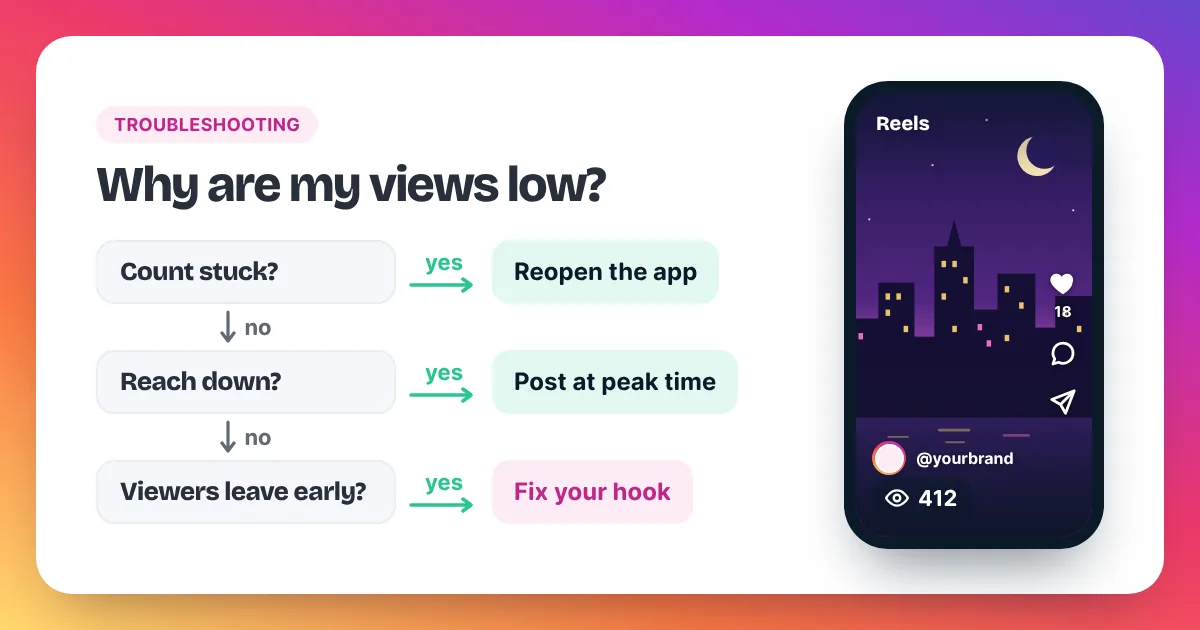
If every number has fallen at once, look at the bigger causes first, starting with our quick checklist for low views. Our troubleshooting guide, why are my Instagram views low, covers 11 of them, from a stuck count to account limits.
Do "Instagram views increase" apps work?
Most free "Instagram views increase" apps don't help, and some put your account at risk. Many ask you to sign in with Instagram, then use your account to watch, like or follow other people's posts in exchange for coins. Never give any app your Instagram password, whatever it promises in return.
These apps usually work as exchange networks. You earn coins when your account watches or likes other users' posts, and you spend the coins on views for your own. The plays come from people who watched only to earn coins, not because they cared about your Reel.
Watch for three warning signs:
- It asks for your Instagram login or a "log in with Instagram" step.
- It pays you in coins for following or liking other accounts, so your account does the work.
- It needs a download from outside the official app stores.
Handing your login to a third-party app can let it take over your session, post spam or get your account locked. A Reel's link is public, so no honest service needs your password to send views to it.
Instagram views kaise badhaye? The same rules apply
Many people in India search "Instagram views kaise badhaye", which means "how do I increase Instagram views". The answer is the same in any language: a strong hook, captions, the right posting time and a Reel worth sharing. Be extra careful with free "views badhane wala" apps that ask for your password.
Paid options: Meta's Boost vs buying views
Paid options for Reel views come in two kinds. Instagram's own Boost turns a Reel into a paid ad shown to an audience you choose, and it is marked as sponsored. A views order raises the view count on one public Reel from its link only. They solve different problems, so pick by goal.
Instagram's Help Center explains Boost in its article "Boost an Instagram Reel". You set a budget, a duration and an audience inside the app, and the Reel runs as an ad after review. It needs a professional account.
| Question | Instagram Boost | Instaviews order |
|---|---|---|
| What it does | Shows your Reel as an ad | Adds views to one Reel's count |
| What you need | A professional account and a payment method in the app | A public Reel link only, never a password |
| Label | Shown as sponsored | No label; the count rises |
| Price | The budget you set | From $3.98 for 2,000 views; 10,000 views for $15.90 |
| Start | After Meta's ad review | Within 2–5 minutes after payment |
| Best for | Reaching a chosen audience, such as a local area | A stronger first impression on a fresh Reel |
A starting boost makes sense when the Reel is already good. If it beats your average in its first hour, extra views can help it make a stronger first impression on new viewers. A views order can't rescue a weak hook, so fix the steps above first.
Keep the order in proportion to your account. A small account adding 2,000 to 10,000 views to a fresh Reel looks normal. Meta's Spam policy lists attempts to "artificially increase viewership", and Instagram can remove plays it treats as inauthentic. Our page on buying Instagram Reel views and our guide to choosing an order size explain how to pick an amount.
How long does it take to get more views?
There is no fixed timeline for getting more Instagram views. Each Reel is its own test. Creators who improve fastest change one thing at a time, post several Reels with that change and compare each result with their own average, not with someone else's numbers.
Start by finding your baseline. Add up the views on your last 10 Reels and divide by 10. For example, 20,000 views across 10 Reels gives an average of 2,000 views per Reel. Any new Reel above 2,000 is progress for your account. Our guide on how many views is viral on Instagram uses the same average to judge a breakout.
Then run a simple testing cycle:
- Pick one change, such as a new style of hook.
- Use it on your next three Reels and keep everything else the same.
- Compare views, watch time and shares with your average.
- Keep the change if it wins. Drop it if it doesn't, and test the next one.
Three Reels per test is a sensible minimum, because one Reel can win or lose by luck.
FAQ
Why are my Instagram Reel views not increasing?
The usual causes are a slow opening, a posting time when your followers are offline, or a topic that didn't catch on. Reposted clips with another app's watermark also tend to get less reach. Check your watch time first, then your posting time.
Do replays count as Instagram views?
Yes. Instagram counts a view each time a Reel starts to play, and again each time it replays. That is why a Reel can have more views than accounts reached. Our guide to how views on Instagram work explains the counting in full.
Does posting more often increase views?
Posting on a steady schedule gives you more chances for a Reel to land and more data to learn from. Quality still comes first. A rushed Reel with a weak hook rarely helps, so post as often as you can keep the standard.
Do hashtags still help Reel views?
Hashtags help describe your Reel, but they won't save a weak one. Use a few that match the topic exactly and spend the saved time on your hook.
Is it better to boost a Reel or buy views?
It depends on your goal. Boost is an ad that puts your Reel in front of a chosen audience. A views order raises the count on one Reel from a link only. Many creators use neither until a Reel already performs above their average.