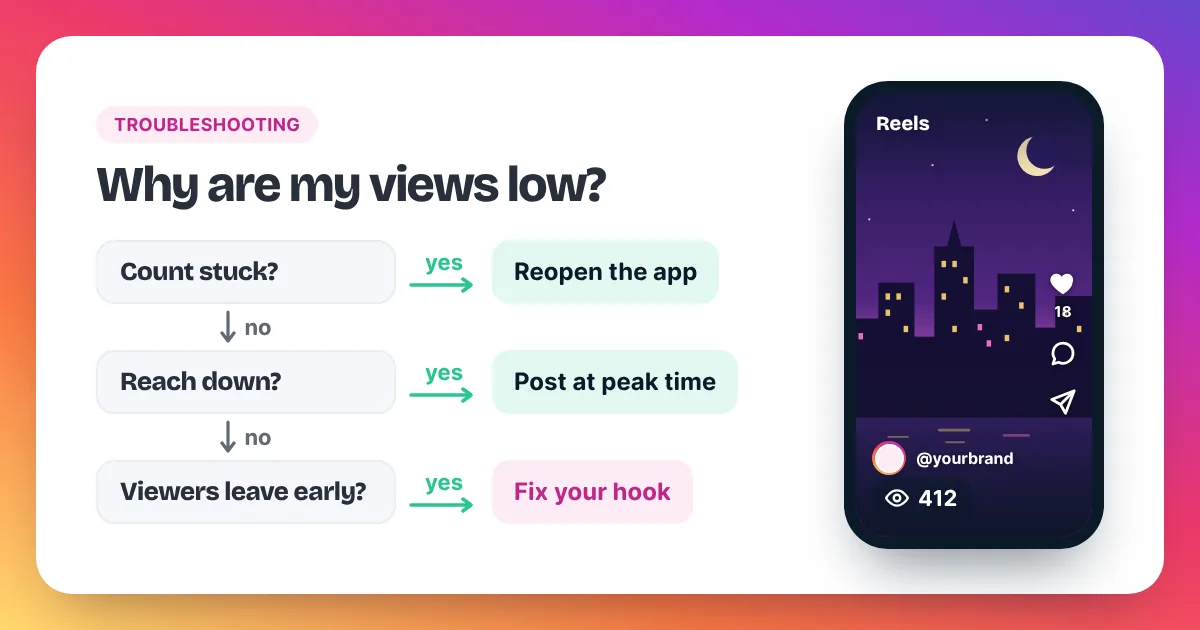
Your last Reel did 3,000 views. This one is sitting at 400. Before you delete it or panic, work through the causes in order. Most of them are fixable within a Reel or two, and a few aren't problems at all.
This guide covers 11 reasons your Instagram views are low, down or stuck, how to check whether your account is limited, and a simple plan for this week. For a quick summary, see our homepage checklist on why Instagram views drop or get stuck.
Why are my Instagram views so low?
Instagram views are usually low for three reasons: people swipe away in the first seconds, you posted when your audience was offline, or the topic didn't catch on. Less often, the view count simply hasn't updated yet, or the Reel goes against Instagram's guidelines and is left out of recommendations.
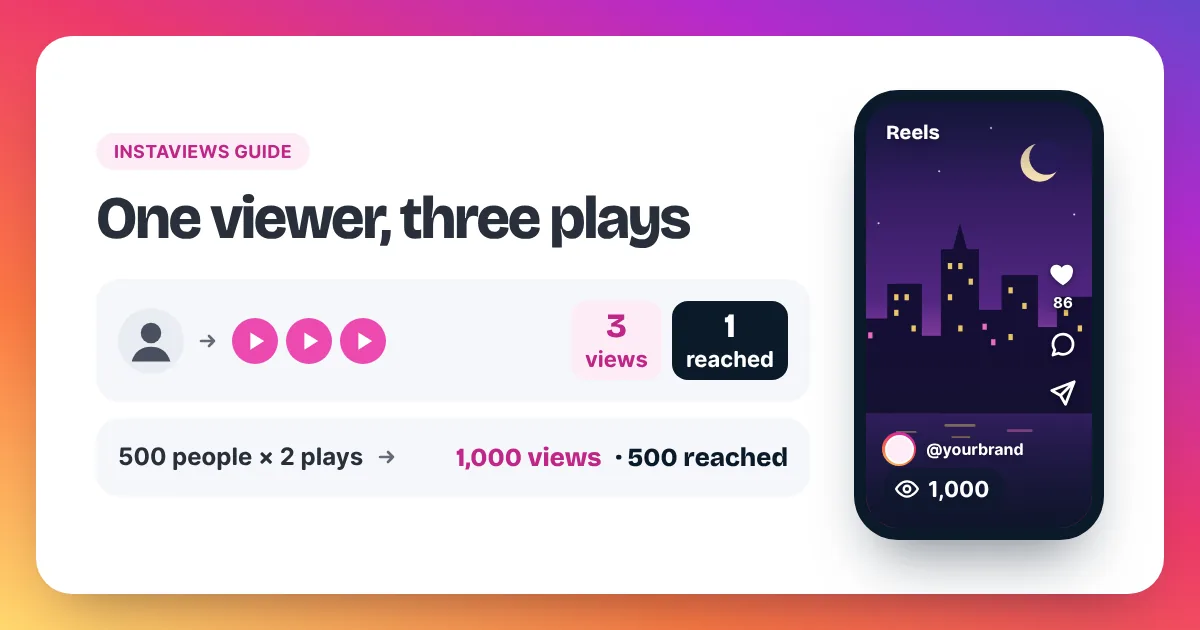
Low Instagram views almost always trace back to one of a few causes, and you can check them in a fixed order. Start with the count itself: Instagram's Help Center has a page called "Why video views aren't showing up on Instagram", and a number that lags for a few minutes is normal. Next, look at the opening. Instagram counts a view each time a Reel starts to play, and again each time it replays, so a Reel that people skip in the first seconds collects few plays and few replays. Then check timing: a Reel posted while your followers sleep has a slow first hour. After that, check originality, because reposted clips with another app's watermark tend to get less reach. Finally, open Account Status in your settings. It shows whether any of your content has been removed or may not be recommended. Fixing the first weak link usually does more than changing everything at once.
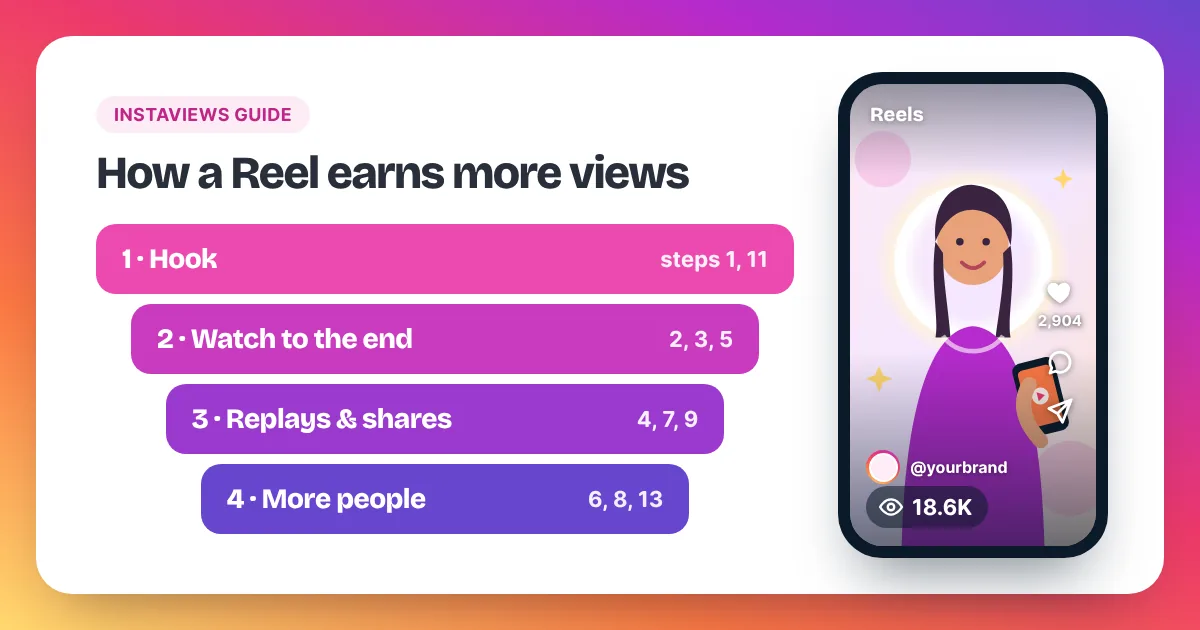
11 reasons your views dropped
Go through these in order. The first four cause most drops. The last one isn't a drop at all.
1. Your hook is too slow
If the first two seconds are a logo, a blank wall or "hey everyone", most people scroll on. Open with the result, a bold line on screen or a quick question. Show the best moment first and explain it after.
2. People stop watching early
Even with a good hook, a slow middle loses viewers. Look at watch time in Insights. If people leave early, cut pauses, speed up the edit and remove anything that repeats. Add captions so people who watch without sound can follow.
3. You posted at the wrong time
A Reel posted while your followers sleep has a quiet first hour. On a professional account, Insights shows when your followers are most active. Post shortly before that window.
4. The content isn't original
Reposts of other people's videos, or clips with another app's watermark, tend to get less reach. Instagram's creator guidance encourages original content. Film your own take, even on a popular trend, and export clean files without other apps' logos.
5. Something shows in Account Status
Content that breaks Instagram's rules can be removed or left out of recommendations. Account Status, in your Instagram settings, shows whether anything on your account has been affected. See the section below on how to check it.
6. The topic sits near sensitive-content limits
Instagram's Help Center explains that some content can stay on Instagram but may not be recommended to people who don't follow you. Topics that brush against those guidelines can reach fewer non-followers. Read Instagram's own pages on recommendations and keep your content well inside them.
7. Your hashtags don't match the Reel
Tags that have nothing to do with the video don't help people find it. Use a few hashtags that describe the topic exactly. Then judge the Reel by its hook and watch time, not by its tags.
8. The audio works against you
Trending audio can help when it fits the idea. A sound that clashes with the topic, drowns out your voice or feels tired can make people swipe. Test your own voiceover or original audio against a trending sound and compare the watch time.
9. You took a long break
After weeks without posting, your followers have moved on to other accounts. The first Reels back may start slowly. Post on a steady schedule you can keep, and judge the results over several Reels, not one.
10. Your audience and your content don't match
If people followed you for recipes and you now post travel clips, many followers won't watch. That lowers views on the new topic. Bridge the change slowly, or mix the new topic with what your audience already enjoys.
11. The count isn't updating
Sometimes nothing is wrong. The number on a Reel can lag for a few minutes. Close and reopen the app, and update Instagram if an update is waiting. Check again later before you change anything.
Why is my Reel view count stuck or frozen?
A Reel view count that looks stuck or frozen is often a display delay. Close and reopen the app, update Instagram and check again later. Instagram's Help Center page "Why video views aren't showing up on Instagram" covers display problems that last longer than a short delay.
Run through these checks before you assume the Reel has stopped:
- Reopen the app. Fully close Instagram, open it again and refresh the Reel.
- Update the app. An old version can show counts late or not at all.
- Check the post type. Photo and carousel posts don't show a play count on the post the way Reels do.
- Check if counts are hidden. If you chose Hide like and view count, others won't see the number. You still see it in Insights.
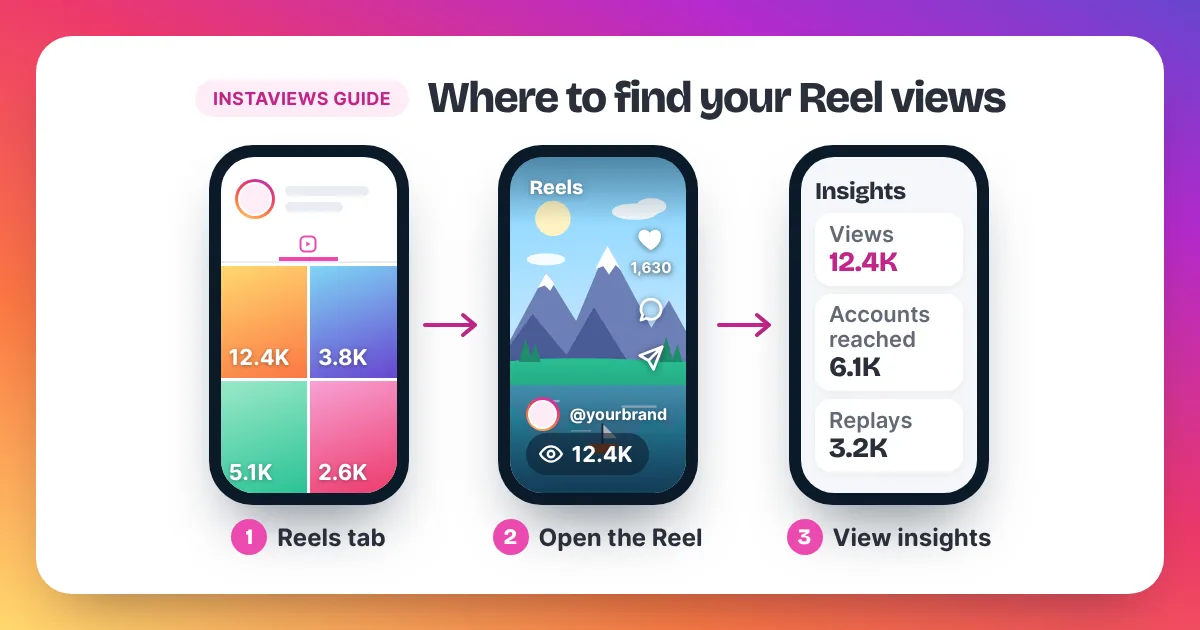
- Check Insights. On a professional account, View insights shows views and accounts reached, even when the post itself shows less.
If you are not sure where each number lives, our guide on how to see your Instagram views shows every screen. A count that truly stops rising usually means the Reel has stopped being shown, not that the counter is broken.
Why does my new Reel have 0 views?
A new Reel that shows 0 views has usually not been shown to anyone yet, or the count has not caught up. Check that the upload finished and the Reel plays, then close and reopen the app. If your account is private, only followers you approve can see the Reel, so it can't reach new people.
- The upload didn't finish. Open the Reel from your profile and make sure it plays. If it is still processing, wait a few minutes.
- The count is behind. Close and reopen Instagram, then check again later. The number can lag for a few minutes.
- Your account is private. Only approved followers can see what you share, so people who don't follow you can't watch the Reel.
- The Reel was removed or limited. Check Account Status in your settings. It shows whether content was removed or may not be recommended.
- View counts are hidden. If you turned on Hide like and view count, other people don't see the number. You still see it in Insights.
If one Reel stays at 0 while all of these check out, post your next Reel as normal and compare the two. One Reel at 0 is rarely a sign that the whole account is limited, and Account Status is the place to confirm it.
Story views vs Reel views dropping
Story views and Reel views measure different audiences. Stories go mainly to people who already follow you, so falling Story views usually mean fewer followers are active or opening your Stories. Reel views can also come from non-followers, so a Reel drop is more often about the hook, the timing or the topic.
If your Story views fall, post fewer frames, put the best one first and use a poll or question sticker to invite taps. If your Reel views fall, go back to the 11 causes above. When both fall at the same time, the cause is often shared: a long posting gap, a change of topic or followers who are less active than before.
How to check if your account is limited
To check whether your Instagram account is limited, open Account Status in your settings. Instagram uses this page to show whether any of your content has been removed or may not be recommended to people who don't follow you, and what you can do next, including asking for a review.
- Open your profile and go to your Instagram settings.
- Find Account Status.
- Read each section. A clear page means nothing on your account has been flagged.
- If something is listed and you think it is a mistake, follow the steps on the page to request a review.
- Delete or edit similar content before you post again.
Treat Account Status as the official answer. Third-party tools that claim to detect hidden limits can't see inside Instagram, and you should never give them your password.
What to do this week
This week, rule out the simple causes first, then fix one thing per Reel. Check Account Status and update the app, work out your average views, rewrite your hooks, post at your most active time and share each Reel to your Story. Compare each new Reel with your own average.
- Day 1: check Account Status and update Instagram.
- Day 1: add up the views on your last 10 Reels and divide by 10. For example, 20,000 views across 10 Reels is an average of 2,000.
- Day 2: rewrite the opening of your next three Reels so the best moment comes first.
- Days 3 to 7: post those Reels at your most active time, with captions, and share each one to your Story.
- Day 7: compare views, watch time and shares with your average. Keep what worked.
For more ideas, our guide on how to get more Instagram Reel views has 15 steps and a table that turns Insights numbers into fixes. If one of the new Reels beats your average, you can give it a fair start with our Instagram Reel views service. Keep the order in proportion to your account.
FAQ
Why did my Instagram views suddenly drop?
A sudden drop usually comes from one Reel with a weaker hook, a different posting time or a topic your followers didn't care about. Check Account Status too. If the next two or three Reels recover, it was the content, not the account.
Why did my Reel views stop going up after the first day?
Reels often collect most of their views soon after posting, while Instagram is still showing them to new people. When the count stops rising, the Reel is usually being shown less, not broken. Make sure the number isn't just slow to update, then look at watch time and shares in Insights and use what you learn in your next Reel.
Why are my Reel views going down every week?
A slow, steady fall often means your format has gone stale for your audience. Try a new hook style, a new series or a collaboration, and compare the results with your average. Our guide on how many views is good or viral shows how to work that average out.
Does deleting and reposting a Reel help?
Rarely. Reposting the same video doesn't fix the cause. Edit the opening, change the cover or caption, and post it as a new version instead.
Do my own plays count as views?
Instagram does not publish a clear rule on whether your own plays count. Either way, the number that matters is how many other people watch. Our guide to how views on Instagram are counted explains plays, replays and reach.
Will buying views fix low views?
A views order raises the count on one Reel. It won't fix a slow hook or the wrong posting time, so fix those first. Meta's Spam policy lists attempts to "artificially increase viewership", and Instagram can remove plays it treats as inauthentic, so keep any order modest.