No. Instagram doesn't show a list of who viewed your Reel or video, and your followers only see the total count. That's the short answer, and it's the same for every account, big or small, personal or professional.
You can still learn a lot about who watched, though. This guide shows what Instagram does let you see: view counts, Insights, likes and comments, Story viewer lists and Live viewers. It also explains why "who viewed my Reels" apps can't deliver what they promise. The details are correct at the time of writing (October 2026) and come from Instagram's own Help Center and announcements.
Can you see who views your Reels on Instagram?
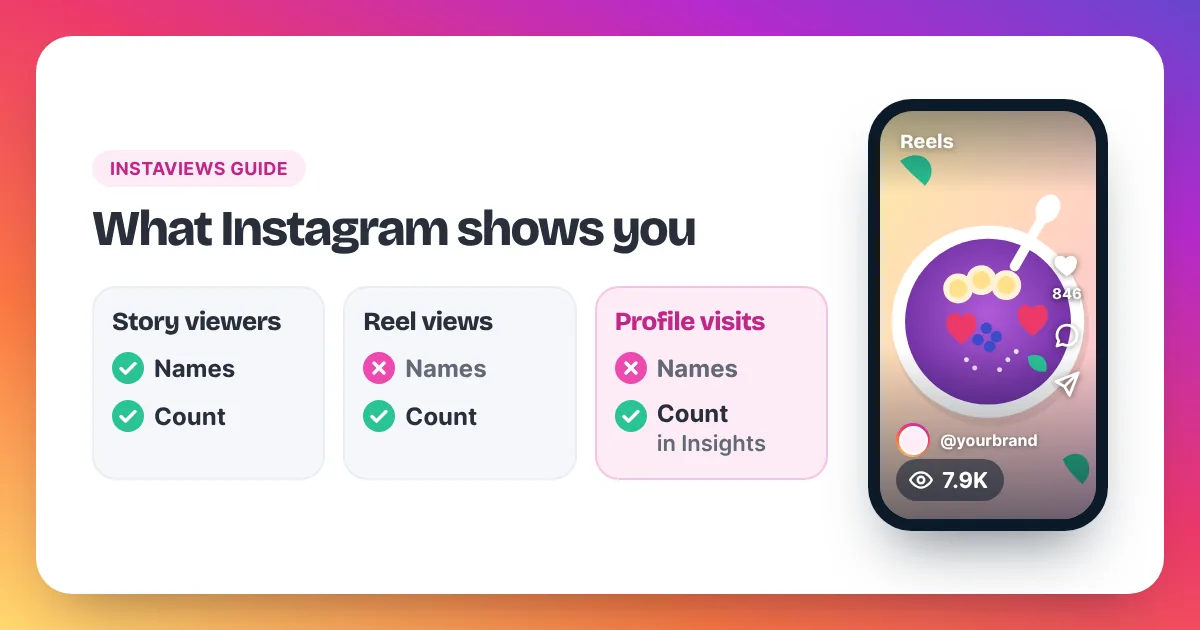
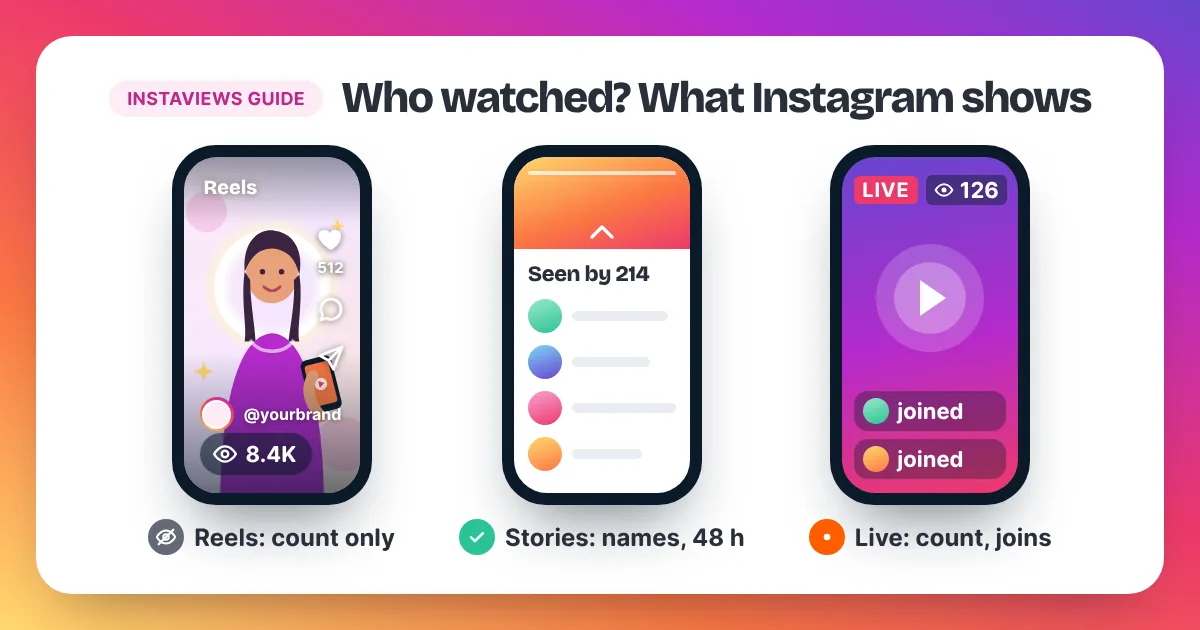
No. Instagram doesn't show who viewed your Reels, on any account type. You see the total view count, and Insights adds numbers such as views, viewers and watch time, but never names. You can see who liked or commented. Stories are where Instagram shows the names of people who watched.
Instagram Reel viewers stay private, even from the person who posted the Reel. Instagram's Help Center lists the numbers you get instead. Views are "the number of times your reel starts to play or replay", so one person can add several views. Viewers are the number of unique accounts that saw your Reel on screen at least once, and Instagram describes this metric as estimated and in development. To open these numbers, Instagram's Help Center says you need a public account, personal or professional. Reel Insights cover Reels posted on or after May 14, 2021. The same Help Center says you won't be able to see who reshared your Reel or where they shared it, whether your account is public or private. The only place Instagram lists the names of people who watched is your Story, and only you can see that list.
What can you see about who watched your Reel?
You can see how many times your Reel was played, how many accounts saw it, how long people watched and how many followed you afterwards. Professional accounts can also split reach into followers and non-followers. Names appear only for likes and comments, never for views.
| What you see | Names? | Where to find it |
|---|---|---|
| Views | No, a count | On the Reel and in Insights |
| Viewers (unique accounts) | No, a count | View insights on the Reel |
| Followers vs non-followers | No, a split of the count | Insights on a professional account |
| Watch time | No, a total and an average | View insights on the Reel |
| Follows | No, a count | View insights on the Reel |
| Likes | Yes | Tap the like count on the Reel |
| Comments | Yes | Under the Reel |
| Reshares | No | Instagram doesn't show who reshared |
The followers and non-followers split comes from Instagram's creator site, which says you can break down your reach that way. It tells you whether your Reel stayed with your audience or travelled to new people. A Reel with mostly non-follower reach is being recommended. A Reel with mostly follower reach is not leaving your circle yet. Our guide to Instagram views vs reach explains how plays and people differ.
How do you see how many people watched your Reel?
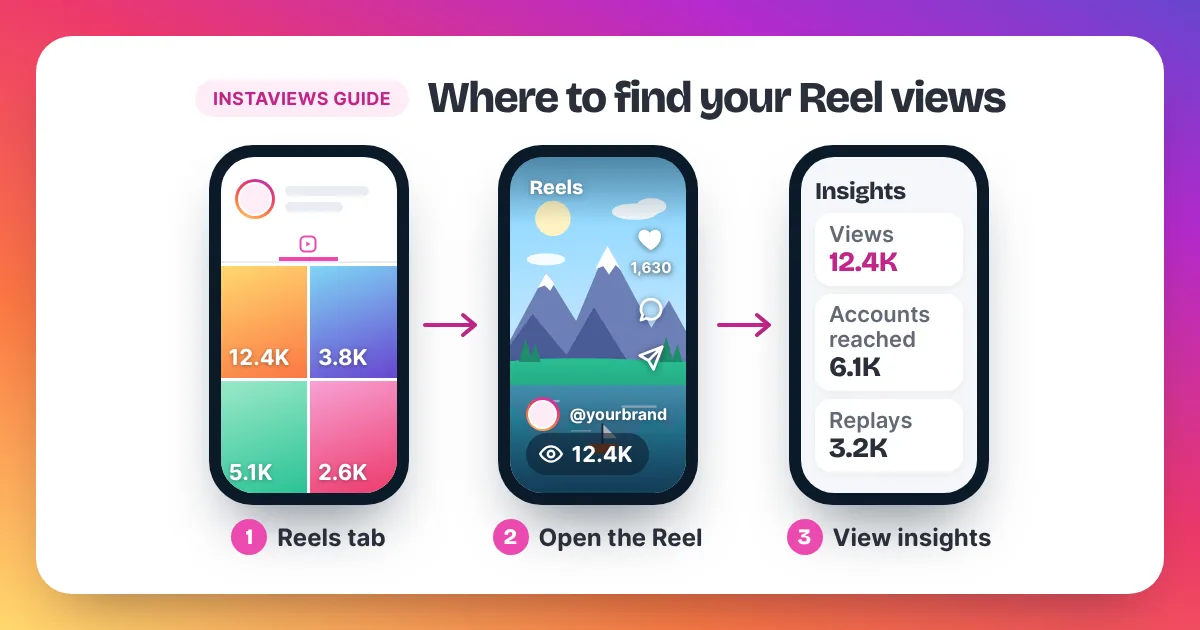
To see how many people watched your Reel, open your profile, tap the Reels tab and open the Reel. Tap View insights. Viewers shows how many different accounts saw it, while Views shows every play and replay. The gap between the two tells you how often people rewatched it.
- Open Instagram and go to your profile.
- Tap the Reels tab and open the Reel you want to check.
- Tap View insights.
- Compare Views with Viewers, then check watch time and follows.
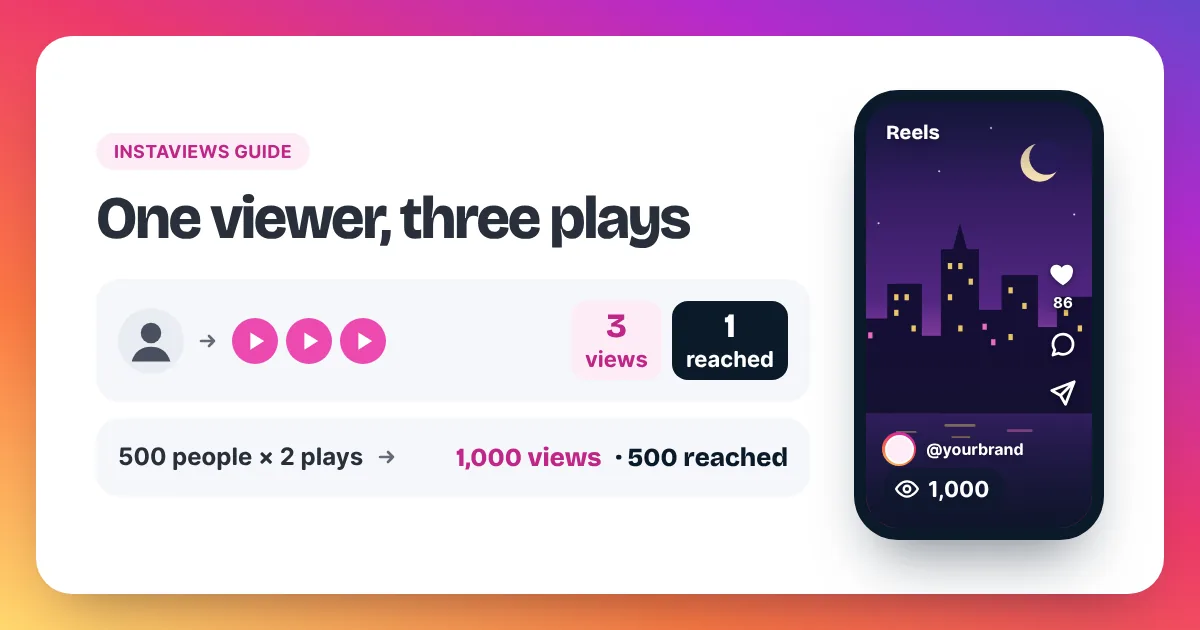
Here is how the numbers fit together. Say 500 accounts each watch your Reel twice. Your Reel shows about 1,000 views, but Viewers shows about 500. Instagram counts a view each time a Reel starts to play or replays, with no minimum watch time. Our homepage section on how Instagram counts views sums this up, and our guide to views on Instagram explains every metric in detail.
What each Reel Insights number means
- Views: how many times your Reel started to play or replay.
- Viewers: how many different accounts saw it on screen at least once. Instagram calls this estimated.
- Watch time: the total time your Reel was played, replays included.
- Average watch time: watch time divided by first plays.
- Follows: accounts that followed you after watching.
Can't find these numbers at all? Our step-by-step guide on how to see your Instagram views covers iPhone, Android and desktop.
Can you see who liked, commented on or shared your Reel?
You can see who liked and who commented on your Reel. Tap the like count to see the accounts, and read the comments under the Reel. You can't see who reshared it. Instagram's Help Center says you won't see who reshared your Reel or where, whether your account is public or private.
Likes and comments are the closest you get to a viewer list. They only show the people who chose to react, though. Most people who watch a Reel scroll on without tapping anything, so these names are a small slice of your real audience.
How are Story viewers different from Reel views?
Stories show names; Reels don't. Open your Story and swipe up to see the number of viewers and their usernames. Only you can see this list. Instagram says you can check who saw your Story for up to 48 hours after you post it, even though the Story itself disappears after 24 hours.
After those 48 hours, the names are gone. Story Insights on a professional account show numbers, not usernames. Viewing works both ways here, too. When you watch someone else's Story, Instagram's Help Center says they'll be able to tell you've seen it.
One trick helps a little. If you share your Reel to your Story, the Story viewer list shows who saw that Story frame. It doesn't prove they tapped through and watched the Reel, but it's the nearest thing to a name list Instagram offers. We don't sell Story views: our service works with public Reel and post links only.
Can you see who watches your Instagram Live?
During a Live, Instagram shows the number of viewers at the top of the screen. Instagram's Help Center also says that when someone starts watching a live video, the person sharing it and other viewers may be able to see that they've joined. So Live is far less private than Reels.
Instagram's Help Center doesn't describe a full list of everyone who watched that the host can open after the Live ends. If you share the replay afterwards, Instagram says the viewer count starts again from zero. Plan any Live questions while you're still on air, when people joining are easiest to spot.
Do "who viewed my Reels" apps work?
No. Instagram doesn't share the names of Reel viewers with anyone, so no app can get them. Many of these apps ask for your Instagram password. Instagram's Help Center warns that giving your login to a third-party app can give it complete access to your account.
The risk is real. Instagram's Help Center also says that giving your username and password to an app or website, such as one offering likes or followers, can get your account restricted. At best, these apps show you a guess based on likes and comments, which you can already see for free.
If you already logged in to one, act now:
- Change your Instagram password. This logs you out on all other devices.
- Check your login activity and remove any login you don't recognise.
- Remove the app's access in your Instagram settings.
- Turn on two-factor authentication.
Profiles work the same way as Reels. Our guide on how to see profile views on Instagram explains what Insights shows about visits and why profile-viewer apps fail too.
How can you tell if a specific person watched your Reel?
You can't tell for sure. Instagram gives no viewer list, no alert and no hint when a particular person watches your Reel. You only know if they liked it, commented, sent it to you in a message, or saw a Story where you shared it. Anything else is guesswork.
The same rule protects you. When you watch someone else's Reel, they don't get your name either. Your play adds one to their view count, and that's all they see.
Can other people see how many views your Reel has?
Yes. Your Reel's view count is public unless you hide it. Anyone who opens your Reel sees the number, but nobody, including you, sees the list of names behind it. If you'd rather keep the count to yourself, our guide on how to hide views on Instagram shows the setting. You still see the full numbers in Insights.
FAQ
Does Instagram notify someone when I watch their Reel?
No. Watching a Reel adds a view to its count, but Instagram doesn't show the owner who watched.
Can I see who watched my Reel more than once?
No. Rewatches raise the view count, but they don't come with names. A big gap between Views and Viewers tells you people are rewatching.
Does a private account show who viewed its Reels?
No. A private account limits who can watch your Reels to approved followers, but it still doesn't list who watched.
Why is my view count higher than my viewers?
Views count every play and replay, while Viewers counts different accounts. One person watching three times adds three views and one viewer.
Which Reels have Insights?
Instagram's Help Center says Reel insights are available for Reels posted on or after May 14, 2021.